


Launching a professional website is an important step for any business. It helps customers discover your services, understand your offerings and contact you online.
But what happens after your website goes live?
Many small business owners invest considerable time and money in website development but pay little attention to ongoing maintenance. They assume that once their website is published, it will continue functioning without additional attention. Unfortunately, websites don’t work that way.
Software requires updates, security threats evolve, business information changes and technical problems can appear unexpectedly. A contact form that stops working, an expired SSL certificate or an outdated service description can affect your website’s usefulness and your customers’ experience. This is why regular website maintenance matters.
The good news is that maintaining a business website doesn’t always require advanced technical knowledge. With a practical checklist and a consistent schedule, business owners can identify many common problems before they become serious.
In this guide, we’ll explore what website maintenance involves, why it’s important and what you should check daily, weekly, monthly and quarterly.
1. What Is Website Maintenance?
Website maintenance is the ongoing process of checking, updating and improving a website to keep it functional, secure, accurate and useful. It involves both technical and non-technical activities.
Common website maintenance tasks include:
- Updating website software
- Checking security
- Creating and verifying backups
- Monitoring website availability
- Testing contact forms
- Reviewing website speed
- Fixing broken links
- Updating business information
- Reviewing website content
- Checking mobile compatibility
- Monitoring search performance
- Renewing domain and hosting services
The exact requirements depend on your website’s size, technology, functionality and business objectives.
For example, a five-page business website generally has different maintenance requirements from an online store processing customer orders.
However, both need regular attention.
2. Why Regular Website Maintenance Matters
our website represents your business even when your office is closed. Potential customers may visit it at any time to explore services, submit enquiries or access important information. Regular maintenance helps keep that experience reliable.
Website Security
Outdated software and poorly managed website components can introduce security vulnerabilities. Applying appropriate updates, maintaining backups and reviewing security settings are important parts of reducing risk. However, no maintenance process can guarantee complete protection against every possible security threat.
Better User Experience
Broken links, missing images, malfunctioning forms and slow-loading pages can frustrate visitors. Regular testing helps identify problems that might otherwise remain unnoticed.
Accurate Business Information
Businesses evolve. Services change, prices may be revised, employees join or leave, and contact information can change. Your website should reflect the current state of your business.
Search Engine Optimisation
Maintenance supports technical SEO by helping identify problems such as broken pages, indexing issues, incorrect redirects and performance difficulties. However, regular maintenance alone does not guarantee higher search rankings.
Business Continuity
Backups, uptime monitoring and documented recovery procedures can reduce disruption when technical problems occur. For businesses that depend heavily on online enquiries or sales, these activities are particularly important.
3. Your Complete Website Maintenance Schedule
Not every website maintenance task needs to be performed daily. Some checks are best performed every day, while others can be scheduled weekly, monthly or quarterly.
The following schedule provides a practical starting point.
| Frequency | Main maintenance activities |
|---|---|
| Daily | Uptime, security alerts, enquiries and critical functionality |
| Weekly | Backups, updates, forms, links and content changes |
| Monthly | Performance, SEO, analytics, mobile usability and security review |
| Quarterly | Content audit, access review, recovery testing and business information |
| Annually | Domain, hosting, policies, technical infrastructure and long-term improvements |
This schedule is illustrative. Websites handling payments, sensitive information or frequent content changes may require more frequent checks.
Part 1: Daily Website Maintenance Checklist
4. Check Whether Your Website Is Accessible
One of the simplest maintenance tasks is confirming that your website is available. A website may become inaccessible because of hosting problems, server configuration issues, expired services or other technical failures.
Check that:
- Your homepage loads correctly.
- Important service pages are accessible.
- Your website uses HTTPS.
- Visitors aren’t encountering obvious server errors.
- Important customer-facing functions remain available.
Businesses that depend heavily on their websites may benefit from automated uptime monitoring. Monitoring tools can alert the website administrator when a website becomes unavailable. However, automated monitoring should complement appropriate technical support rather than replace it.
5. Monitor Important Customer Enquiries
A website may appear to function correctly while its enquiry system has stopped working.
For example, a contact form might accept submissions without successfully delivering notifications.
This problem can remain unnoticed for days.
Regularly check important communication channels, including:
- Website contact forms
- Booking enquiries
- Quotation requests
- Customer support forms
- Relevant website notifications
You don’t necessarily need to submit a test form every day. Instead, monitor normal enquiry activity and investigate unusual interruptions. Schedule separate functional tests at appropriate intervals. For businesses that depend on online enquiries, this is one of the most important maintenance activities.
6. Review Critical Security Alerts
If your hosting provider, website security system or content management platform generates important security alerts, review them promptly.
These might include notifications about:
- Suspicious login attempts
- Malware detection
- Vulnerable software
- Unexpected file changes
- Unusual website activity
- Account security issues
Avoid assuming that every alert represents a confirmed attack. Investigate the issue and follow the appropriate response procedure. If your website has been compromised, professional technical assistance may be necessary.

Part 2: Weekly Website Maintenance Checklist
7. Create and Verify Website Backups
ackups are among the most important parts of website maintenance. A backup provides a recovery option if website files become damaged, software updates cause problems or important information is accidentally deleted.
For a typical WordPress website, a complete backup generally includes:
- Website files
- WordPress installation files
- Themes
- Plugins
- Uploaded media
- Website database
- Relevant configuration files
Your backup strategy should reflect how frequently your website changes. A website receiving daily orders may require substantially more frequent backups than a simple informational website.
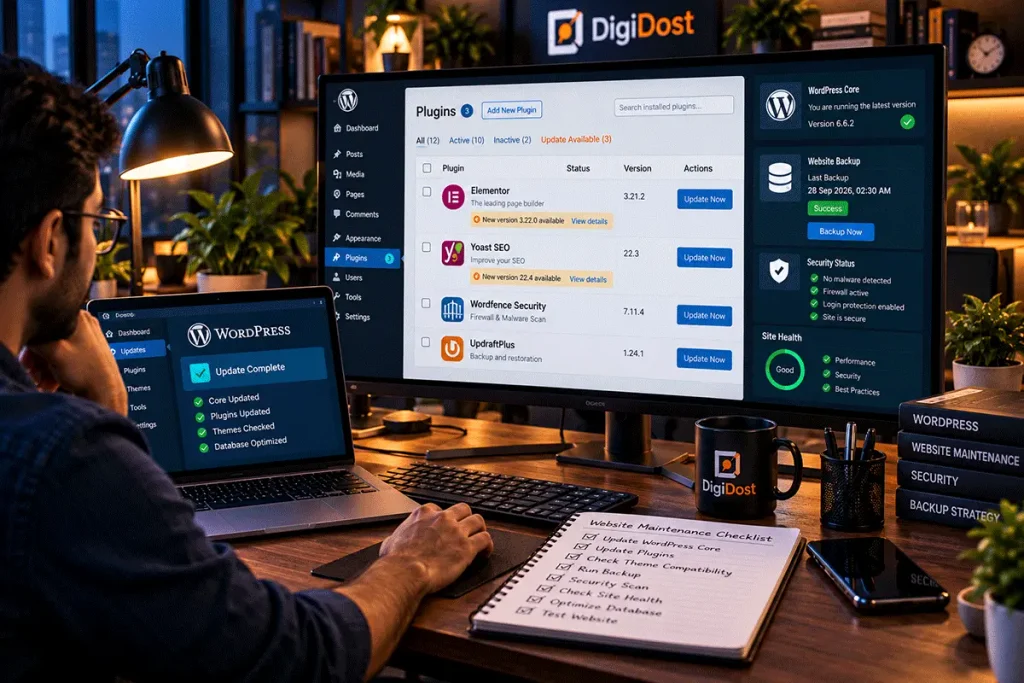
8. Check for WordPress, Theme and Plugin Updates
If your business website uses WordPress, software maintenance deserves particular attention.
WordPress websites commonly include three major software components:
- WordPress core
- Active theme
- Installed plugins
Updates may include security fixes, compatibility improvements, bug fixes and new features. However, applying updates without preparation can sometimes create compatibility problems.
A Safer WordPress Update Process
Before updating:
- Confirm that a recent, usable backup exists.
- Review the available updates.
- Check important compatibility information.
- Use a staging environment when practical.
- Apply updates in a controlled manner.
- Test important website functions afterwards.
Security-related updates should receive appropriate priority. Avoid delaying important security fixes simply to maintain a fixed weekly schedule. If you use a custom WordPress theme, make sure updates to other components don’t interfere with its functionality.
9. Test Important Website Functions
A website can load successfully while some of its features remain broken. Test the functions that matter most to your business.
Examples include:
- Contact forms
- Enquiry buttons
- WhatsApp links
- Email links
- Search functionality
- Booking forms
- Navigation menus
- Important download links
For e-commerce websites, additional testing may include shopping carts, checkout procedures and payment integrations. Use suitable test environments and avoid creating unnecessary live transactions. Document any problems you discover so they can be resolved systematically.
10. Review Recently Updated Content
Businesses frequently publish new content or update existing pages. After publishing, check that the content appears correctly.
Review:
- Headings
- Paragraph formatting
- Images
- Internal links
- Buttons
- Mobile layout
- Important contact information
If multiple employees or service providers manage your website, establish a simple content review process. This helps prevent formatting inconsistencies and accidental publication errors.
Part 3: Monthly Website Maintenance Checklist
11. Review Website Speed and Performance
Website performance influences the experience visitors have when accessing your content. Slow-loading pages can create frustration, particularly for people using mobile devices or slower internet connections.
Performance can be affected by:
- Large images
- Excessive scripts
- Inefficient plugins
- Poor hosting performance
- Unoptimised code
- Third-party integrations
- Caching configuration
Use suitable performance testing tools to identify potential issues. Google PageSpeed Insights is one option for reviewing performance-related information. However, avoid focusing exclusively on obtaining a perfect score. Prioritise meaningful improvements to real visitor experiences.
12. Check Your Website on Mobile Devices
Your website should remain functional and readable across different screen sizes. Even if it was originally developed with responsive design, later changes can introduce layout problems.
For example, a newly added table may extend beyond a mobile screen, or a promotional banner might cover an important navigation button.
Check:
- Navigation menus
- Heading sizes
- Paragraph readability
- Image scaling
- Buttons
- Forms
- Tables
- Important interactive elements
Test representative pages rather than checking only your homepage. Where practical, use actual mobile devices alongside browser-based testing tools.

13. Find and Fix Broken Links
Broken links can interrupt the browsing experience.
They may appear when pages are deleted, URLs change or external websites remove content. Review important internal and external links periodically.
Pay particular attention to:
- Main navigation links
- Service page links
- Contact page links
- Important blog references
- Download links
- Promotional landing pages
When changing an existing page URL, consider whether an appropriate redirect is necessary. Avoid automatically redirecting unrelated deleted pages to your homepage. Choose destinations that genuinely help visitors find relevant information.
14. Review Website Security
Website security involves more than installing a security plugin. Review your broader security arrangements.
Important areas include:
Administrator accounts
Confirm that access is limited to authorised users.
Passwords
Use strong, unique passwords and suitable password management practices.
Multifactor authentication
Enable it where supported and appropriate.
Software updates
Check whether important security updates remain outstanding.
Backups
Verify that backup systems are operating as intended.
HTTPS
Confirm that your website’s certificate remains valid.
Security monitoring
Review relevant alerts and unusual activity.
Security requirements vary according to your website’s functionality and the information it handles. Websites processing sensitive customer information may require additional controls and professional security assessments.

15. Review Your Website’s SEO Health
Search engine optimisation isn’t a one-time activity. Technical problems can develop after website updates, content changes or URL modifications. A monthly SEO review can help identify issues.
Check important areas such as:
- Search indexing
- Crawl errors
- Important page availability
- Canonical URL configuration
- Internal linking
- Redirects
- Sitemap accessibility
- Mobile usability
- Search performance
Google Search Console can provide useful information about your website’s presence in Google Search. Not every warning requires immediate action, and not every excluded URL represents a problem. Evaluate issues according to their relevance and potential impact.
16. Review Website Analytics
Website analytics can help you understand how visitors interact with your website.
Depending on your analytics configuration, you may be able to review:
- Website traffic
- Traffic sources
- Popular pages
- Visitor engagement
- Important events
- Enquiry submissions
- Conversions
Compare the information with your business objectives.
For example, a service-based business may be more interested in relevant enquiries than in overall visitor numbers.
Avoid making major decisions based on a single metric without understanding its context. Ensure your analytics implementation respects applicable privacy requirements.
Part 4: Quarterly Website Maintenance Checklist
17. Conduct a Website Content Audit
Your website content should reflect your current business. Over time, older pages may contain outdated information, broken references or descriptions that no longer accurately represent your services. A quarterly review can help identify pages requiring attention.
Check:
- Service descriptions
- Product information
- Team information
- Business credentials
- Contact details
- Frequently asked questions
- Promotional information
- Blog articles
- Important policies
Prioritise pages that directly influence customer decisions. Not every article requires quarterly rewriting. Update content when there is a genuine reason to improve its accuracy, usefulness or relevance.
18. Review Website User Accounts and Permissions
Businesses sometimes provide website access to employees, freelancers, developers and external agencies. Over time, unnecessary accounts can accumulate.
Review:
- Existing user accounts
- Administrator permissions
- Former employee access
- External service-provider access
- Unused accounts
- Authentication settings
Apply the principle of least privilege. Users should receive the access necessary to perform their responsibilities without automatically receiving full administrative permissions. Remove or disable access that is no longer required.
19. Test Your Website Recovery Process
Having a backup is important, but knowing how to restore your website is equally valuable. A recovery test helps determine whether your backup and restoration procedures work as expected. Where practical, test restoration in a staging or separate environment rather than overwriting your live website.
Document:
- Backup locations
- Restoration procedures
- Important credentials and their secure storage locations
- Hosting support contacts
- Domain management information
- Recovery responsibilities
Do not store passwords in publicly accessible documentation. A documented recovery process can make technical emergencies easier to manage.
20. Review Your Website’s Design and User Experience
Small design problems can accumulate as new pages, promotional banners and website features are introduced. Periodically review your website from a visitor’s perspective.
Ask:
- Is navigation straightforward?
- Are important services easy to find?
- Is the contact process clear?
- Are headings readable?
- Do buttons work correctly?
- Are there unnecessary distractions?
- Is the website usable on mobile devices?
- Does the design still reflect our branding?
You don’t need to redesign your website every quarter. Focus on correcting genuine usability problems and maintaining consistency.
Part 5: Annual Website Maintenance Checklist
21. Review Domain, Hosting and SSL Renewals
Domain registration and hosting are essential parts of keeping your website accessible. Review renewal dates and account details before services expire.
Check:
- Domain registration
- Hosting subscription
- SSL certificate arrangements
- Important email services
- Premium plugin licences
- Third-party subscriptions
- Payment method information
Where appropriate, enable automatic renewal and ensure the associated payment information remains current. However, don’t rely exclusively on automatic renewal. Maintain your own renewal records and verify important transactions.
22. Review Privacy Policies and Website Compliance
Your website may collect personal information through forms, analytics, cookies, customer accounts or other features. Review your privacy-related information and data-handling practices periodically.
Consider:
- Privacy policy accuracy
- Contact form data collection
- Analytics implementation
- Cookie and consent arrangements
- Data retention
- Third-party integrations
- Access to collected information
Applicable requirements depend on your jurisdiction, business activities and data-processing arrangements. Seek qualified legal advice where necessary. Avoid copying another business’s privacy policy without confirming that it accurately describes your own practices.
23. Evaluate Your Website’s Long-Term Requirements
Your business may change significantly over a year. Perhaps you introduced new services, expanded into additional markets or started receiving more website enquiries. Review whether your existing website still supports your requirements.
Consider:
- Hosting capacity
- Website functionality
- Content management
- Security arrangements
- Design requirements
- Integrations
- Performance
- Ongoing maintenance costs
Some improvements may require minor updates. Others may justify larger development projects. Base these decisions on actual business requirements rather than redesigning your website simply because a year has passed.
24. A Special Website Maintenance Checklist for WordPress
WordPress is widely used for business websites because it provides flexible content management and a large ecosystem of themes and plugins. However, its flexibility also creates maintenance responsibilities. If your business uses WordPress, pay particular attention to the following areas.
WordPress Core
Review available updates and apply them through an appropriate update process.
Themes
Keep supported themes updated and review compatibility with your WordPress installation. For custom themes, maintain access to the original code and development documentation.
Plugins
Review installed plugins regularly. Remove plugins that are genuinely unnecessary, but check dependencies before deleting anything.
Database
Maintain database backups and investigate database-related problems when they occur. Avoid using database optimisation tools without understanding their effects.
Media Library
Review large images, unnecessary uploads and missing media. Optimise images appropriately without deleting files still used by your website.
Website Security
Review administrator accounts, authentication, software vulnerabilities and security monitoring.
Backups
Maintain reliable backups covering both website files and the database.
Staging Environment
Where practical, test significant changes before applying them to your live website. A staging environment is particularly valuable for complex websites and custom WordPress development.
25. Should You Maintain Your Website Yourself or Hire a Professional?
Not every website maintenance task requires a developer. Many business owners can manage basic activities themselves.
These might include:
- Reviewing published content
- Updating contact information
- Checking enquiry messages
- Reviewing website appearance
- Monitoring renewal dates
However, more technical responsibilities may require professional support.
Examples include:
- Resolving security incidents
- Fixing complex software conflicts
- Troubleshooting server problems
- Repairing database issues
- Investigating significant performance problems
- Maintaining custom WordPress functionality
The appropriate approach depends on your technical knowledge, available time and the importance of your website to your business. Some businesses prefer handling content updates internally while outsourcing technical maintenance. Others choose a comprehensive website maintenance arrangement.

26. Downloadable-Style Website Maintenance Checklist
Use the following checklist as a starting point for your own maintenance routine.
Daily
- Confirm the website is accessible.
- Review important enquiries.
- Investigate critical security or availability alerts.
Weekly
- Verify recent backups.
- Review relevant software updates.
- Test important website functions.
- Check recently published content.
- Investigate reported technical problems.
Monthly
- Review website performance.
- Test important pages on mobile devices.
- Check important links.
- Review website security.
- Examine SEO-related issues.
- Review website analytics.
Quarterly
- Audit important website content.
- Review user accounts and permissions.
- Test backup restoration.
- Evaluate navigation and usability.
- Confirm business information is current.
Annually
- Review domain and hosting renewals.
- Check important subscriptions and licences.
- Review privacy-related information.
- Evaluate hosting and technical requirements.
- Plan significant website improvements.
Adjust the frequency according to your website’s actual requirements.
Final Thoughts
Your business website needs ongoing attention after launch. Regular maintenance helps you identify technical problems, maintain accurate information, improve usability and prepare for unexpected disruptions.
You don’t need to perform every task every day. Instead, establish a practical maintenance schedule based on your website’s complexity and business requirements.
Start with the essentials: reliable backups, important software updates, security monitoring, working enquiry forms and accurate business information.Then introduce broader performance, SEO and content reviews. A consistent maintenance routine can help your website remain a dependable part of your business’s digital presence.
Keep Your Business Website Running With DigiDost
Managing a business website requires time, attention and appropriate technical support. DigiDost provides website development and business support services, including website maintenance, content updates and ongoing digital assistance.
Whether you operate a simple business website or a custom WordPress platform, our team can help you establish a more organised approach to website management.
Explore our Website Development and Business Support services to learn more.
DigiDost — Digital Growth Made Simple.
Har Business ka Digital Dost.